Script keys
Script keys turn a one-line instruction into a single keystroke order. Bind a key combo to a short script and TickForge places that order — on the symbol currently linked to your Order Entry widget — the moment you press the key. They're the fastest way to trade a repeatable plan: scale in, take half off, flatten, or fire a full bracket without touching the mouse.
Script keys can send the order to the Interactive Brokers server instantly. If Quick Trade Mode is on (Settings → Trading), there is no confirmation step. Always test a new script on a paper account first.
Creating a script key
Open Settings → Script Keys and click + Add Script Key:
- Name it something you'll recognize (for example, "Buy 100 at ask").
- Key Combo — click the field and press the keys you want (for example, Ctrl+Shift+1).
- Script — type the instruction (see below).
- Click Validate to check it, then Save.
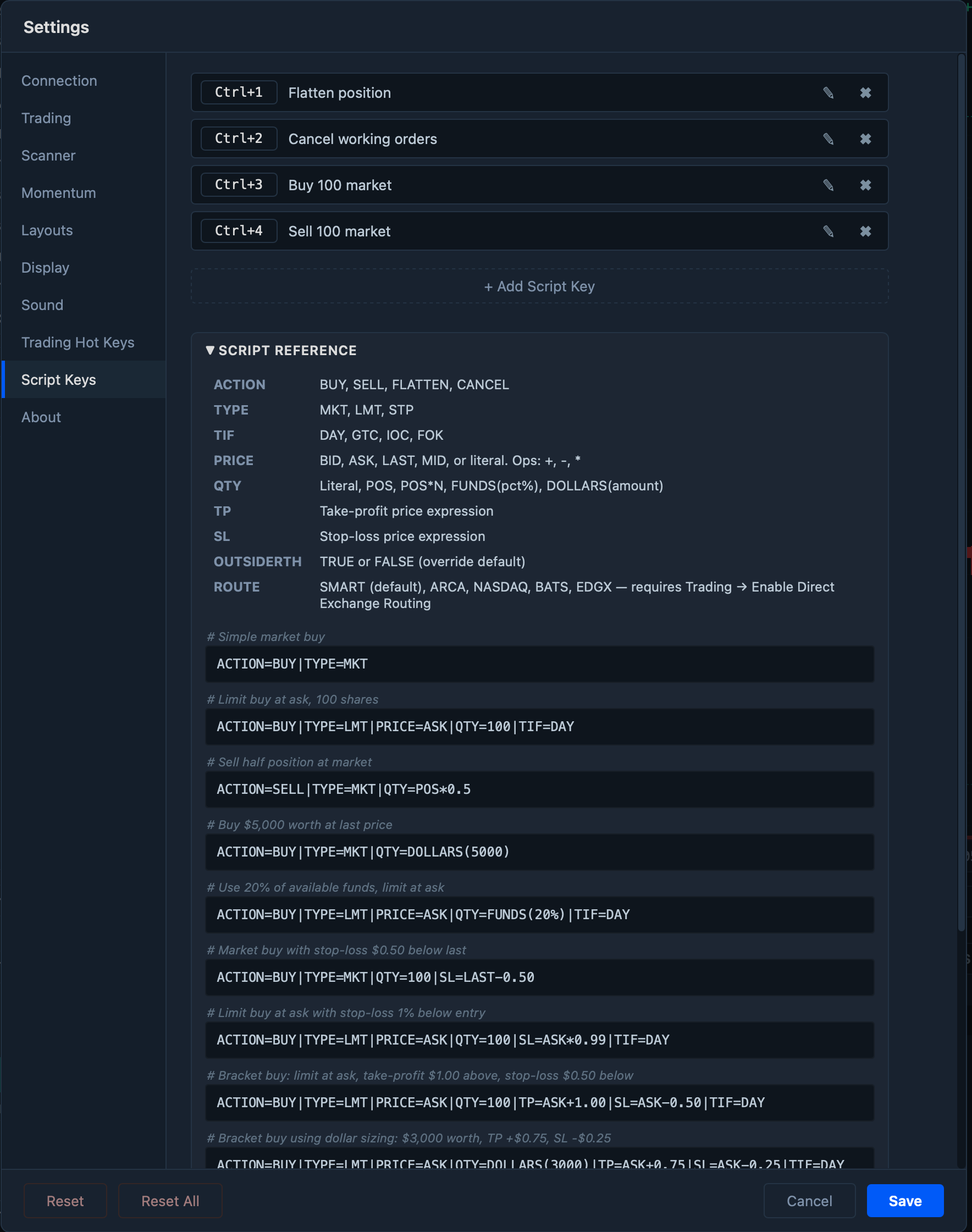
When you press a script key, the order is sent to Interactive Brokers for the symbol currently loaded in your Order Entry widget — there is no symbol field in the script. Load the symbol you want in Order Entry first (by typing it there, or via a link group), then press the key; the same script works on whatever symbol Order Entry is showing.
How a script is built
A script is a list of FIELD=VALUE pairs joined by the pipe character |:
ACTION=BUY|TYPE=LMT|PRICE=ASK|QTY=100|TIF=DAY
Only ACTION is required. Every other field is optional and falls back to your Trading settings (or a built-in default) when you leave it out. Field names are not case-sensitive.
Fields
| Field | Values | Notes |
|---|---|---|
| ACTION | BUY, SELL, FLATTEN, CANCEL | Required. |
| TYPE | MKT, LMT, STP | Default MKT. LMT and STP require a PRICE. |
| PRICE | BID, ASK, LAST, MID, or a number | The limit price — or the trigger price for a STP order. |
| QTY | a number, POS, POS*N, FUNDS(pct%), DOLLARS(amount) | Defaults to your Trading default quantity. |
| TIF | DAY, GTC, IOC, FOK | Default DAY. |
| TP | a price expression | Take-profit leg. |
| SL | a price expression | Stop-loss leg. Include both TP and SL for a bracket order. |
| OUTSIDERTH | TRUE, FALSE | Allow the order to work outside regular trading hours. |
| ROUTE | SMART, ARCA, NASDAQ, BATS, EDGX | Needs Trading → Enable Direct Exchange Routing; otherwise everything routes SMART. |
Prices
A price is an anchor — BID, ASK, LAST, or MID (the bid/ask midpoint) — or a plain number like 150.25. You can offset an anchor with one operator:
ASK+0.05— five cents above the askBID-0.03— three cents below the bidASK*0.99— one percent below the ask
Only a single operation is allowed (+, -, or *) — there's no chaining like ASK+0.05*2. TP and SL accept the same price expressions.
Sizing
QTY accepts more than a share count:
100— a fixed number of shares.POS— your entire current position (handy for exits).POS*0.5— a fraction of your position (here, half), rounded down to whole shares.DOLLARS(5000)— about $5,000 worth at the last price.FUNDS(20%)— about 20% of your available funds at the last price.
Time in force
TIF sets how long the order stays alive at the broker:
DAY— works only for the current trading day; any unfilled portion is cancelled at the close.GTC— good 'til cancelled; stays working across days until it fills or you cancel it.IOC— immediate or cancel; fills whatever it can the instant it arrives and cancels the rest (a partial fill is allowed).FOK— fill or kill; must fill in full immediately or it is cancelled entirely (no partial fill).
Examples
Copy any of these into a script key and adjust the numbers to your plan.
Entries
ACTION=BUY|TYPE=MKT|QTY=100
Buy 100 shares at market.
ACTION=BUY|TYPE=LMT|PRICE=ASK|QTY=100|TIF=DAY
Buy 100 at the ask as a day limit.
ACTION=BUY|TYPE=LMT|PRICE=BID+0.01|QTY=200|TIF=DAY
Join the bid plus a penny for 200 shares.
Sizing by money
ACTION=BUY|TYPE=MKT|QTY=DOLLARS(5000)
Buy roughly $5,000 worth at market.
ACTION=BUY|TYPE=LMT|PRICE=ASK|QTY=FUNDS(20%)|TIF=DAY
Commit about 20% of available funds, limit at the ask.
Exits
ACTION=SELL|TYPE=MKT|QTY=POS
Sell the whole position at market.
ACTION=SELL|TYPE=MKT|QTY=POS*0.5
Take half off at market.
ACTION=SELL|TYPE=LMT|PRICE=ASK|QTY=POS|TIF=DAY
Offer the entire position at the ask.
Stops
ACTION=SELL|TYPE=STP|PRICE=LAST-0.30|QTY=POS
Stop the whole position out 30 cents below the last price.
Brackets (entry + take-profit + stop-loss)
ACTION=BUY|TYPE=LMT|PRICE=ASK|QTY=100|TP=ASK+1.00|SL=ASK-0.50|TIF=DAY
Buy 100 at the ask, target +$1.00, stop −$0.50.
ACTION=BUY|TYPE=LMT|PRICE=ASK|QTY=DOLLARS(3000)|TP=ASK+0.75|SL=ASK-0.25|TIF=DAY
A bracket sized by dollars: about $3,000 worth, target +$0.75, stop −$0.25.
ACTION=BUY|TYPE=LMT|PRICE=ASK|QTY=100|SL=ASK*0.99|TIF=DAY
Buy with a protective stop one percent below the entry (no profit target).
Short selling
ACTION=SELL|TYPE=LMT|PRICE=BID|QTY=200|TP=BID-0.80|SL=BID+0.40|TIF=DAY
Short 200 at the bid; cover $0.80 lower, stop out $0.40 higher.
Routing and extended hours
ACTION=BUY|TYPE=LMT|PRICE=BID|QTY=100|ROUTE=ARCA|TIF=DAY
Route directly to ARCA (requires direct routing enabled).
ACTION=BUY|TYPE=LMT|PRICE=ASK|QTY=100|OUTSIDERTH=TRUE|TIF=DAY
Allow the order to work in the pre- and post-market.
Emergency keys
ACTION=FLATTEN
Close the active symbol's position immediately at market (always routed SMART). All other fields are ignored.
ACTION=CANCEL
Cancel every open order on the account. All other fields are ignored.
Starter scripts (Buy, Sell, Flatten, Cancel) can be installed for you during the first-run setup, or any time by re-running the setup wizard.
Where to next
- Connect Claude Desktop — ask Claude about your account and place orders by describing them.